
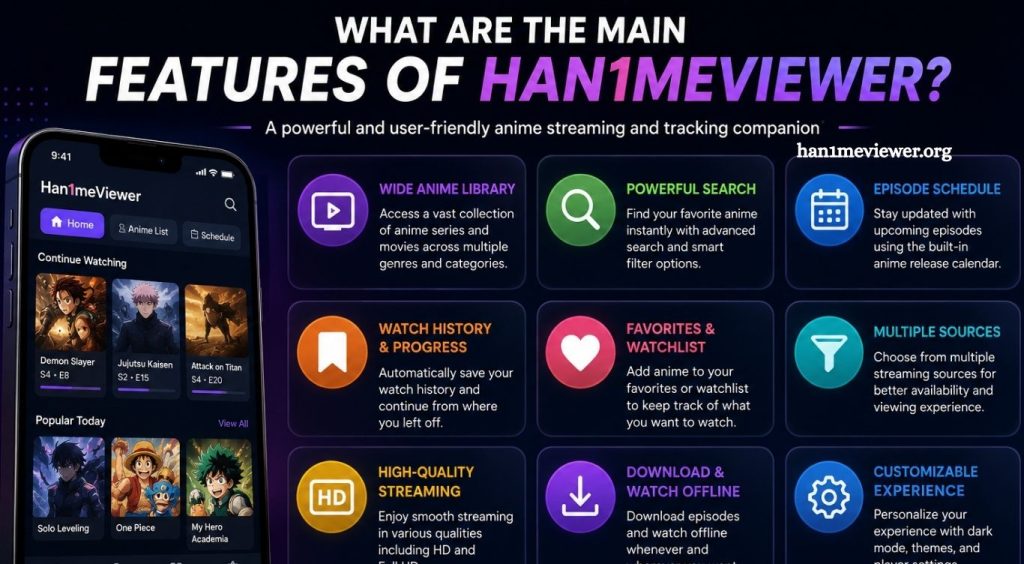
Han1meViewer is an Android client designed for browsing, searching, watching, and managing video content through a mobile-friendly interface. Built with modern Android technologies, the application focuses on making content discovery and video playback easier from smartphones and tablets.
The app combines several useful tools in one interface, including search, video playback, downloads, playlists, watch history, comments, subscriptions, and playback customization. Its open-source development also gives users and developers a way to examine how the application is structured and how its different components work together.
Easy Content Discovery
One of the main features of Han1meViewer is its content discovery system. The home screen provides access to different categories and video sections, helping users find new content without navigating through complicated menus.
Read More: Why is Han1meViewer not working on my device?
The application also includes featured areas, latest content, previews, and search access. Its discovery interface uses categorized sections and horizontally scrollable content areas, creating a familiar experience for Android users.
Advanced Search
Han1meViewer includes a search system designed to make finding specific content easier. Users can search using keywords and access additional filtering options through advanced search functionality.
Search history can also make repeated searches faster. The application provides pagination and filter information, helping users narrow down results when a large number of matches are available.
Detailed Video Pages
Each video can have a dedicated information page containing useful details before playback. Depending on the available content, users can view descriptions, authors, tags, related videos, series information, and comments.
This approach allows users to understand more about a video before watching it and discover related content from the same page.
Flexible Video Playback
Video playback is another major part of Han1meViewer. The application provides an integrated video player with controls designed for mobile viewing.
Supported playback features include playback-speed controls, video-quality selection, different playback engines, and picture-in-picture functionality. Later releases also introduced support for portrait video playback and improvements to the player experience.
Picture-in-Picture Mode
Picture-in-picture mode allows supported videos to continue playing in a small floating window while users interact with other applications.
This feature can be particularly useful on Android devices when users want to keep watching content while checking messages, browsing another application, or performing another task. Release notes show that picture-in-picture support was added and later expanded for older Android versions.
Multiple Playback Engines
Han1meViewer supports different playback technologies, giving users greater flexibility when watching videos. Its project documentation lists Media3, JZVD, and MPV among the technologies used within the application.
MPV support is particularly notable because later releases added an Anime4K upscaling feature specifically for the MPV playback engine. This gives compatible users additional options for improving the visual presentation of supported videos.
Download Manager
The application also includes download management functionality. Users can manage downloaded video files, organize downloads, and play downloaded content.
Recent project updates added background download management, private-directory downloads, and the ability to open downloaded videos with an external player. These features make local video management more flexible.
Watch Later, Favorites, and Playlists
Han1meViewer provides several tools for organizing content. Users can save videos for later viewing, mark favorites, create custom playlists, and manage saved items.
The application also maintains viewing history, allowing users to find previously watched content more easily. According to the project documentation, most personalized list features require authentication, while watch history can be used independently.
Comments and Community Features
Video pages can include comments and replies, allowing users to interact with discussions around available content. Han1meViewer supports comment browsing, replies, sorting, and related actions.
The project has also received updates addressing comment parsing, showing that comment functionality is an actively considered part of the application’s development.
User Accounts and Subscriptions
For users who want a more personalized experience, Han1meViewer provides account-related features. These include authentication, account information, subscriptions, and access to personalized content lists.
Users can subscribe to creators and manage saved content through their account, making the application more suitable for regular viewers who want to maintain an organized viewing experience.
Customizable Settings
Han1meViewer includes a settings area with multiple customization options. The project documentation lists Material 3 theming, home-page layout settings, playback preferences, MPV configuration, download settings, and network settings.
These options allow users to adjust the application according to their device, network connection, and preferred viewing experience.
Privacy Features
Privacy controls are another part of the application’s feature set. The project documentation lists an application lock, launcher-icon disguise, and manual cookie management among its privacy-related functions.
Users should still review permissions, account settings, downloaded files, and the source of any APK before installing or using an Android application.
Network and Connectivity Tools
Han1meViewer includes several network-related features intended to help maintain connectivity. Its project documentation mentions Cloudflare handling, alternative domains, proxy settings, CDN and network detection, and update checking.
These tools can become useful when connection conditions or access requirements change. However, performance can still depend on the device, internet connection, server availability, and application version.
Responsive Android Interface
The application is designed around Android devices and uses modern Android development technologies. Its interface includes support for phones and larger screens, while newer releases have also included tablet-related UI improvements.
The combination of categorized browsing, detailed video pages, customizable playback, and account tools creates a more complete experience than a basic video player.
Why Han1meViewer Stands Out
Han1meViewer combines content discovery, playback, organization, and customization within one Android application. Its strongest features include advanced search, integrated playback, picture-in-picture mode, multiple player engines, download management, playlists, favorites, watch history, comments, subscriptions, and customizable settings.
The open-source nature of the project also makes its technical structure visible to developers interested in Android application architecture. The project uses Kotlin and several modern Android libraries, including Jetpack Compose, Navigation Compose, ViewModel, StateFlow, Retrofit, Room, WorkManager, and Media3.
Conclusion
Han1meViewer offers a feature-rich Android experience focused on video discovery and playback. Search tools help users find content, while playlists, favorites, history, and downloads provide better organization. Playback features such as quality controls, multiple engines, picture-in-picture, and MPV support add flexibility for different viewing preferences.